
Spellchecking FAQ
Some questions (and answers) that might be of use to you.
- Q1. How do I know what version of Mac OS X I have?
- Q2. I installed cocoAspell but the second download wouldn't install properly.
- Q3. What about PowerPC-based Macs?
- Q4. I'm running Tiger or Snow Leopard. Both packages installed successfully. But my Gaelic text is still marked as mis-spelled. What do I do now?
- Q5. How do I use the Gaelic spellchecker in (almost) any Mac OS X application?
- Q6. How do I make my application spell-check in English again?
- Q7. Why is closing and re-opening the application necessary after a dictionary change? It's such a nuisance!
- Q8. What gives you the right to tell me how to spell? You're a fraud!
- Q9. What makes you think you know anything about spellcheckers? You're a fraud!
- Q10. Can I use the spellchecker in iWork Pages? If so, how?
- Q11. What about OpenOffice/LibreOffice on Windows? Or Linux? Or (even) Solaris?
- Q12. I use OpenOffice, and I can't seem to select Scottish Gaelic as a language option. What's gone wrong?
- Q13. The installer tells me I haven't installed cocoAspell, but I have!
- Q14. What about Microsoft Office on Mac?
- Q15. I have a question not on this list. What do I do?
← Back to spellchecker homepage
Q1. How do I know what version of Mac OS X I have?
Click on the Apple menu (top left corner of your screen) and select "About This Mac". If the dialog box that appears has 10.6.X in it (where X is any number) then you've got Snow Leopard. If the second number is greater than 6 then you fit into the "later" category. 10.5.X means you've got Leopard, and if it says 10.4.X then you're on Tiger.
Q2. I installed cocoAspell but the second download wouldn't install properly.
What version of Mac OS X are you running? cocoAspell is only needed for Leopard or Tiger. I haven't a machine with those to test, however, so if you are running them and it doesn't work for you I'd appreciate it if you sent me full details of the behaviour you observe.
Q3. What about PowerPC-based Macs?
The two-step cocoAspell-based solution compiles the Aspell dictionary in situ, so (providing you use the PowerPC version of cocoAspell) the dictionary should work for you.
Q4. I'm running Tiger or Snow Leopard. Both packages installed successfully. But my Gaelic text is still marked as mis-spelled. What do I do now?
First make sure you've activated the Gaelic dictionary.
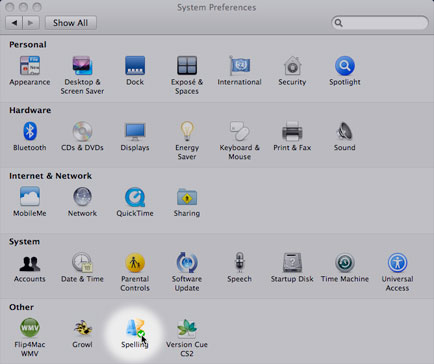
Open System Preferences and click the Spelling icon:
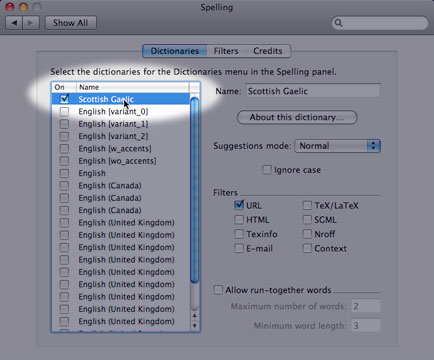
Now make sure a tick appears next to Scottish Gaelic:
Ok, you should be able to use the spellchecker in (almost) any Mac OS X application.
Q5. How do I use the Gaelic spellchecker in (almost) any Mac OS X application?
Let's take Apple Mail as an example.
Go to the Edit menu and choose "Show Spelling and Grammar":
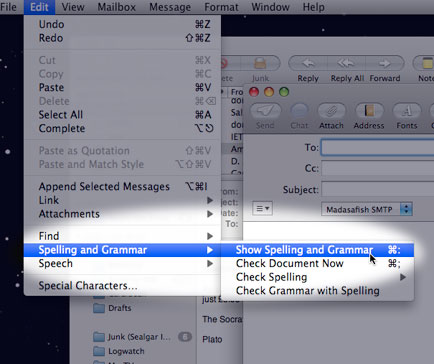
Now select the Scottish Gaelic dictionary (which should be visible).
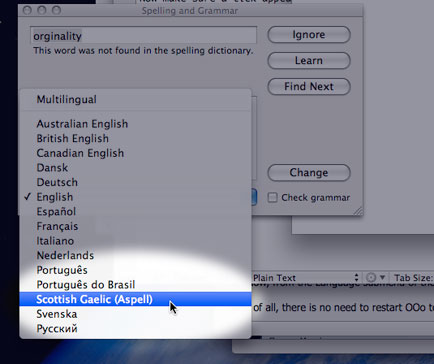
If you're running Tiger or Leopard there is an additional step, which is a bit of a nuisance: you must close and re-open Mail for your change of dictionary to take effect. With the release of Snow Leopard this close-and-reopen malarky is no longer needed! Hurrah!
However, spell checking "Automatically by Language" will NOT work with Gaelic; you have to explicitly select it from the drop-down. This is another Apple bug and applies to any OpenSpell dictionary See discussion here for more info on this.
Q6. How do I make my application spell-check in English again?
See the answer above; only pick the English (or "Automatically by Language") option this time. Remember to close and then re-open the application (if you're using Tiger/Leopard).
Q7. Why is closing and re-opening the application necessary after a dictionary change? It's such a nuisance!
Yes, and it shouldn't really be necessary. It is a bug Apple introduced into their spelling framework which affects ALL external spelling extensions. For a full (technical) explanation, see www.nanoant.com/apple/nsspellserver-guilty-of-tearing-my-hair-out
Happily Apple have fixed this bug with the release of Snow Leopard.
Q8 What gives you the right to tell me how to spell? You're a fraud!
Well, I hope I didn't give the impression that the dictionary was my work. I'm no linguist, only the (humble) packager. The dictionary was produced for Bòrd na Gàidhlig by The European Language Initiative (TELI) and a lot of scholarship has gone into it (and will continue to go into it). I'm just grateful they've let us use the wordlist for this.
Q9. What makes you think you know anything about spellcheckers? You're a fraud!
I readily confess I am a newbie to spelling technology. I've researched the subject a bit in the past few months, but I'm a very long way from being an expert. In the spirit of open-source software I want to make something I find useful available to others, but if you think I'm going about it in the wrong way or you have suggestions as to how something about the process could be improved I'd love to hear them.
Q10. Can I use the spellchecker in iWork Pages? If so, how?
Yes. This is one case where the older Pages was far superior to the newer Pages versions 5 and 6 though.
Pages 3 and 4 work very well with the spellchecker--you can work with English and Gaelic text in the same document. The interface is a little obscure, however. Within Pages, highlight your Gaelic text. Now open the inspector and go to the "Text" panel (marked with a "T"). Click the tab that says "More" (the fourth one). On the panel that appears -- near the bottom -- you should see a language dropdown. Just select Scottish Gaelic and your text should be spellchecked correctly.
Pages 5 and 6 (in common with the rest of macOS) have abandoned this perfectly sensible way of working in favour of spellchecking "automatically by language". This works great if you're typing in English, Spanish and Italian in the same document. Sadly however it's unable to detect you're using Gaelic (or any other minority language). And, more irritatingly, it's impossible to tell the program what you're doing. So you can either spellcheck automatically by language (not including Gaelic) or explicitly change the whole document over to Gaelic (and have any English paragraphes be marked as incorrect).
If, like me you thing this is a backward step, please give some feedback to Apple on the subject. Ideally they would allow third-party spellcheckers to be included in the "automatically by language" API but failing that reinstating the ability to specify a per-paragaph spellchecking language would be much appreciated.
Q11. What about OpenOffice/LibreOffice on Windows? Or Linux? Or (even) Solaris?
OXT files are just zipped archives, and should in theory be platform independent. This means the package should work for you on OpenOffice (v3), no matter which OS you are using. However, I've not tested this claim very vigorously, so please let me know if you encounter problems. (Or even if you encounter success -- I'm a sucker for esteem-boosting emails.) But please read the next FAQ before concluding it doesn't work...
Q12. I use OpenOffice, and I can't seem to select Scottish Gaelic as a language option. What's gone wrong?
Are you running OpenOffice.org v3? Earlier versions are not supported -- consider upgrading; it's free! If that isn't your problem, read on...
On Windows (and possibly some other OSs) I've found it is necessary to restart the machine after installing the new dictionary. Otherwise, spellchecking with the new dictionary doesn't appear to work. This looks like a bug in OpenOffice rather than my dictionary, but I'm not an OOo expert and could be completely wrong about that. (As always, any enlightenment by OOo gurus on this would be gratefully received.) So if you've installed the dictionary, but Gaelic text you know is wrong is not being marked as such, try restarting before doing anything else (nb it's not enough to close and reopen OOo itself).
Another problem you may see (on all OSs) is that OpenOffice.org seems to be slightly odd in the way it treats languages available on the Tools menu. Alternative languages (such as Scottish Gaelic) don't seem to appear until you modify the document in some way (even by adding a space somewhere and removing it again). This applies equally to new (blank) documents and also to those that have text in them. I'm not sure of the reason for this, or if it appears in all minor point revisions of the app. But I've seen the behaviour, and a kind beta-tester has also reported what I take to be the same phenomenon. So try altering your document (even if only slightly) before despairing.
In fact, don't despair even then. I've created a short video that shows how I got it to work -- take a look, it might help you. If that doesn't help you still need not despair. Just get in touch, describing your exact problem (and setup).
Q13. The installer tells me I haven't installed cocoAspell, but I have!
To enable support for Intel and PowerPC macs, the dictionary is compiled at install-time. This means the program must have access to the aspell binary, which cocoAspell normally installs in /usr/local/bin/aspell. If you see this error then the chances are your aspell binary is installed somewhere else. If you know where it is, and are familiar with the command line, creating a symlink from /usr/local/bin/aspell to the binary might be a workaround worth trying. If that last sentence made no sense to you, then just get in touch. I'd like to catch any instances where cocoAspell does not put the aspell bin into what I take to be the standard location.
Q14. What about Microsoft Office on Mac?
Regrettably, Microsoft Office on Mac uses neither the system-wide Spellchecker that everything else uses, nor the Microsoft spellcheckers created for its Windows sibling. That means (to the best of my knowledge) Gaelic spellchecking on the Mac with Microsoft Office is impossible. If this bothers you, please bring it to Microsoft's attention: they have the dictionary for the Windows version of Office and it would be trivial for them to produce it in Mac-compatible format (if they believe a demand exists).
In theory, if you know how to work with custom dictionaries, you might be able to create a file for Scottish Gaelic using the Wentworth database from SMO, but that's not an ideal solution and may cause performance issues.
As a workaround, you can always write in TextEdit or OpenOffice and copy/paste into Word when you're satisfied with the spelling.
Q15. I have a question not on this list. What do I do?
No need for discombobulation. Just get in touch.


